
For Windows and Mac
Finish everyday work with your own files.
The AI works on your computer, so it keeps working when the internet doesn't.
Free. Windows 10 or 11, or a Mac with Apple silicon.
Needs the internet once to download the AI (3 to 6 GB). Install notes
Hi, I'm Non.


Three things NONON does.
Give it your files and say what you need. Here is what it can do today.
-
Compare two spreadsheets
Give it two Excel or .csv spreadsheets, like your bank list and your own records. It shows every row that does not match. It adds up the money itself, so the totals are exact.
-
Turn meeting notes into a follow-up
Give it your notes. You get a short summary and a list of who does what. Anything missing, like a name or a date, is marked for you.
-
Turn a reading into a study sheet
Give it a reading. You get a study sheet with practice questions and an answer key. It is built only from your reading.
And also
Tidy a folder
NONON lists every move first. Nothing moves until you say OK.
Draft a document
Get a first draft from your notes or a file. Then edit it your way.
Run it on a schedule
Repeat a job every week. It runs while your computer is on and awake.
You stay in charge.
NONON is a helper, not the boss. It asks before it changes anything.
It shows you first.
NONON shows what it wants to change and waits for your OK.
It keeps a backup.
Before it changes a file, it saves a copy of the original.
You can undo.
Changed your mind? Undo it. If you edited the file since, NONON stops and tells you. It will not erase your work.
On your computer
This is how NONON starts.
- The AIIt reads your files and writes the results right here.
- Your files, backups and routinesThey stay in your folders.
- Local-only projectsThese never use online AI, even on a schedule.
Only if you turn it on
Off until you switch it on. NONON tells you what will be sent first.
- Online AI: Claude, Codex or AntigravityThe words and files for that job go to the company that runs it. You pay them on your own plan.
- GmailNONON can read the messages you allow, straight from Google, and summarize them with the AI on your computer. It does not send or delete mail.
Needs the internet once to download the AI (3 to 6 GB). After that, its core jobs work offline. Gmail and online AI always need the internet. Some parts are still being tested, so please read what works today.
How it works.
Three steps. You do not need to learn how to write prompts.
-
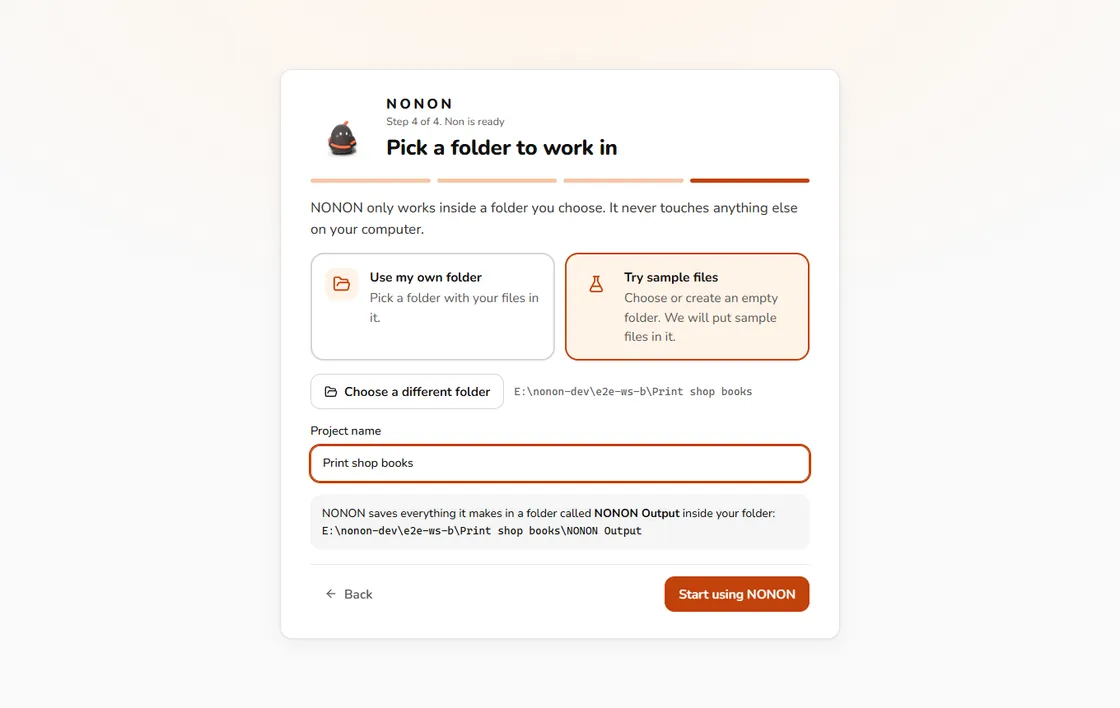
Pick a folder
Choose the folder with your files. NONON only works where you point it.
-
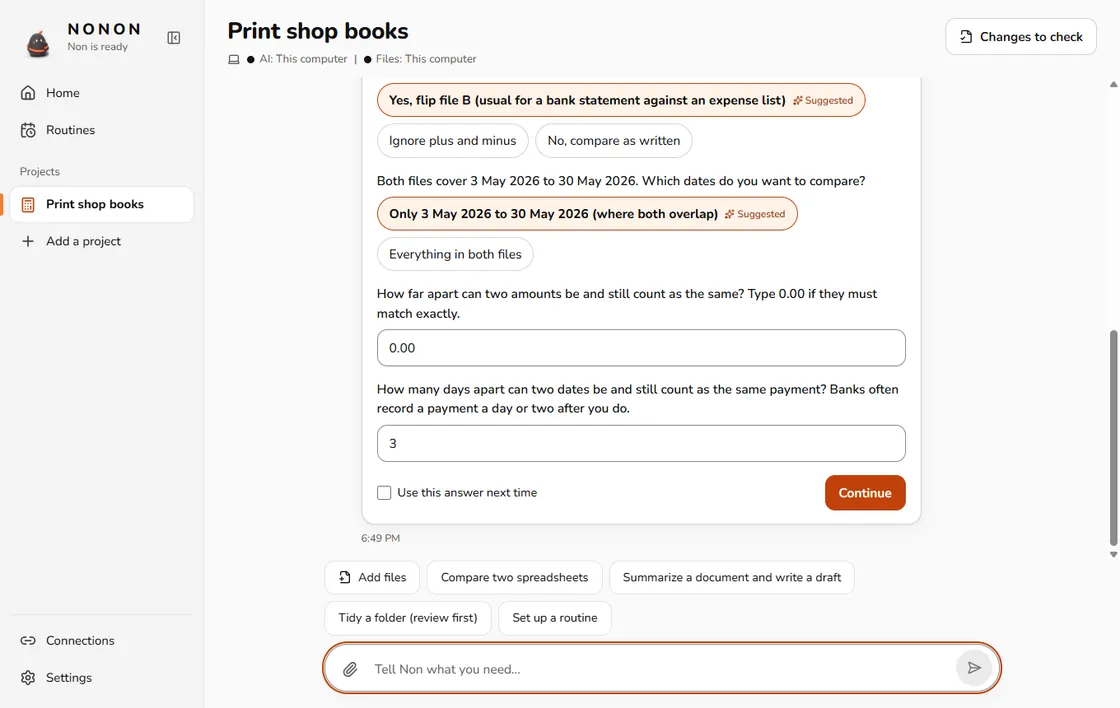
Tell Non what you need
Say it in your own words, like you would to a coworker. Non asks a question only when the answer matters.
-
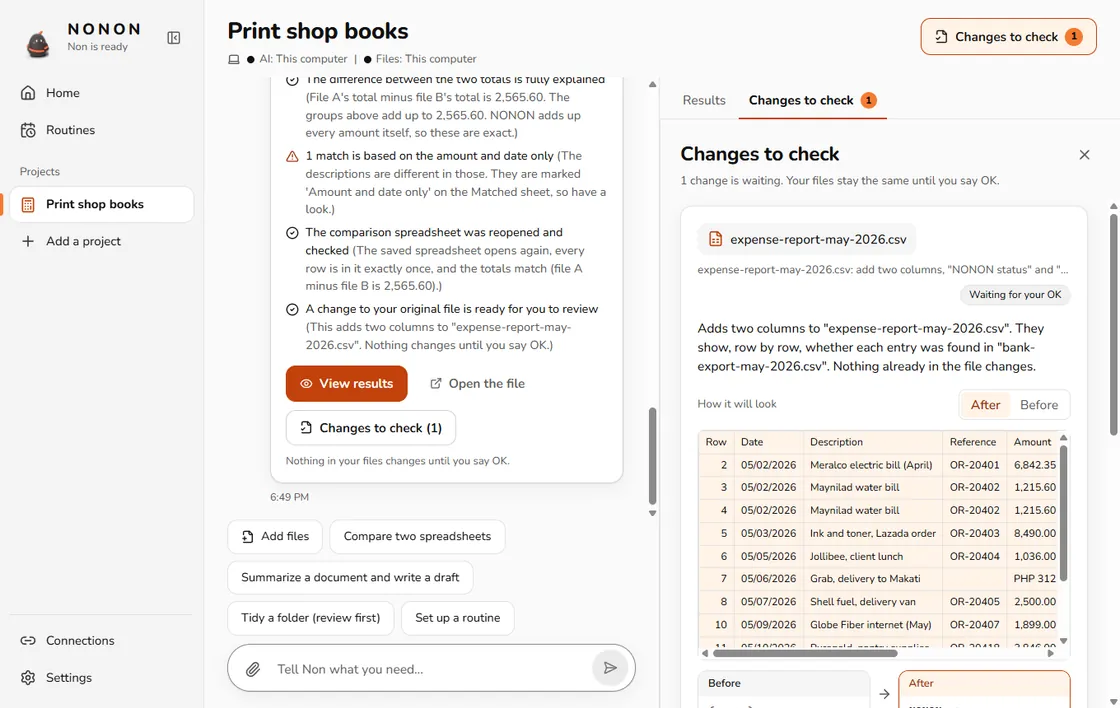
Check and approve
Look over the result and any change waiting for your OK. Your files stay the same until you approve.
Who it is for.
People who work with files all day and do not want to become AI experts.

Small-business owners
Match your bank list to your own records. Tidy a messy folder.
Freelancers
Turn client call notes into a follow-up with who does what.
Bookkeepers
Compare two statements and see every row that does not match.
Teachers and students
Turn a reading into a study sheet, or plan a lesson.
Not yet
We would rather say it plainly. These are not ready.
- A phone app
- Linux
- Intel Macs
- Scanned PDFs
- Other characters, later
Questions people ask.
Is it free?
NONON is free to use. Online AI services you connect may charge you on their own plans.
Does it need the internet?
Only once, to download the AI (3 to 6 GB). After that, its core jobs work with no connection. Gmail and online AI always need the internet, because those services do.
Is my data sent anywhere?
Not by default. Your files and the AI stay on your computer, and this site has no tracking. Setup downloads the AI from public websites. If you turn on Claude, Codex, Antigravity or Gmail, the content of that job goes to that service. NONON tells you before it does. Read the privacy page for the full list.
Which computers does it run on?
Windows 10 or 11 (64-bit), and Macs with Apple silicon (M1 or later). It does not run on Intel Macs, Linux or phones. Aim for 8 GB of memory at least. 16 GB is better.
Which AI does it use?
By default, a small open AI that runs on your computer. You can also connect Claude, Codex or Antigravity if you already use them. They are optional.
What if the AI is wrong?
A small AI can make mistakes. So NONON adds up the numbers with ordinary code, shows where each result came from, and marks what is missing. It never changes your files until you say OK. Check its work the way you would check a new helper's.
Can I undo a change?
Yes. NONON saves a copy of the original before it changes a file, and you can undo from there. If you edited the file after that, NONON stops and tells you instead of writing over your work.
Who made it?
Kyle Cabahug, an independent developer. NONON builds on open work: llama.cpp, Qwen3.5 and Pragma. Non is the Pragma mascot Pip, used with permission of its owner. The credits page has the details.
Try it on a folder of your own files.
Start with the sample files if you like. Nothing of yours is touched.
Free. Windows 10 or 11, or a Mac with Apple silicon.